

Artificial intelligence is moving beyond chatbots and simple content generation.
Businesses are increasingly exploring AI agents that can understand goals, access information, use business tools, make decisions, and complete multiple steps with limited human intervention.
Instead of simply answering a question, an AI agent can potentially take action.
For example, a traditional chatbot might answer a customer's question about an order. An AI agent could understand the request, check the order management system, review the customer's information, determine what needs to happen, initiate an appropriate action, and update the relevant system.
This shift is making AI agents an important part of modern business automation.
But where can businesses actually use them?
What Are AI Agents?
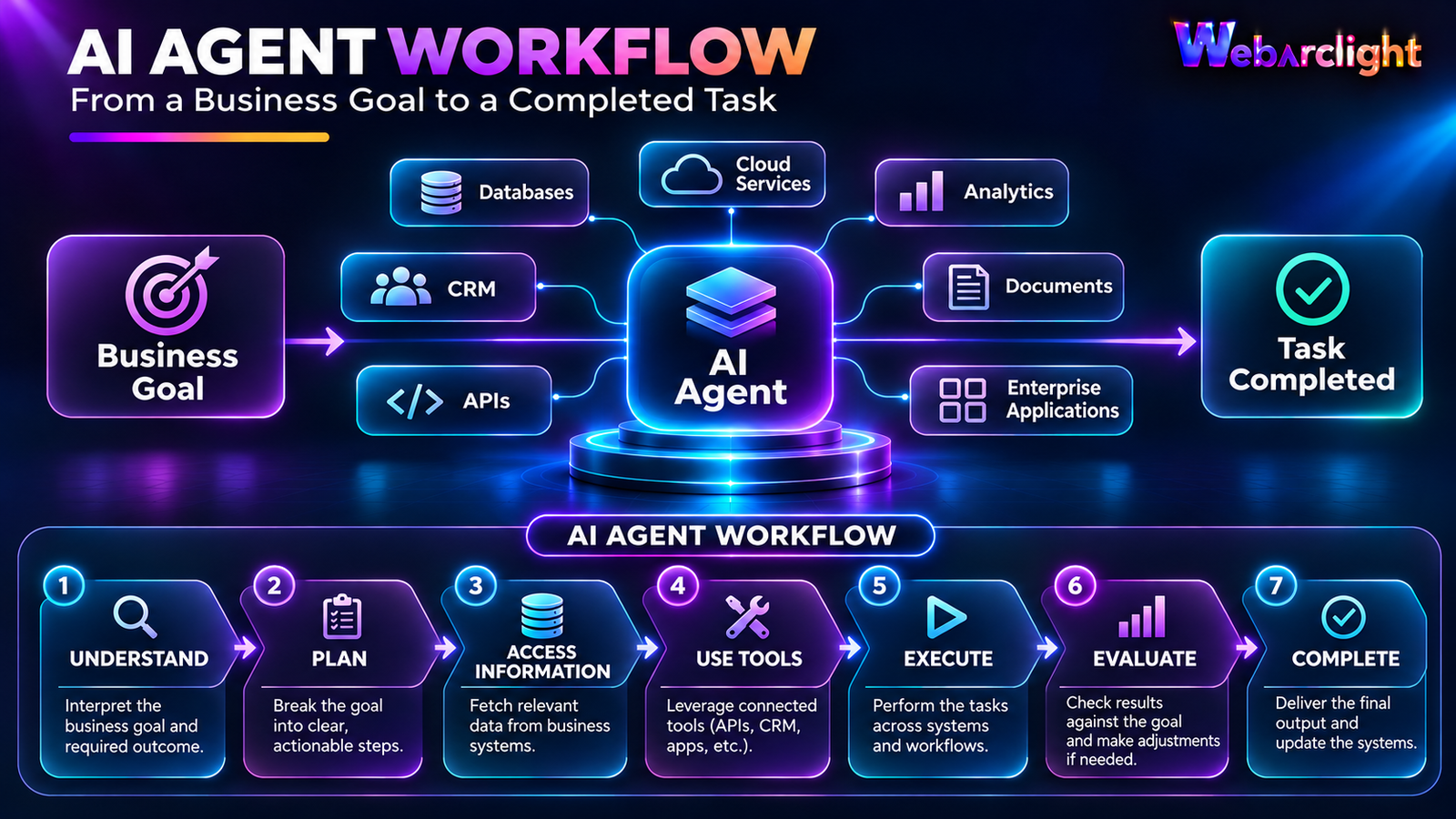
AI agents are software systems designed to work toward a specific goal by understanding information, reasoning about the next step, using available tools, and taking actions.
A typical AI agent workflow can involve:
Understand → Plan → Access Information → Use Tools → Execute → Evaluate → Complete
Unlike traditional automation, which usually follows predefined rules, AI agents can handle situations where the exact path to the outcome may vary.
For businesses, this creates opportunities to automate more complex workflows.
1. Customer Support
Customer service is one of the most practical areas for AI agents.
Traditional customer-support automation may provide predefined answers or route requests to the appropriate department.
An AI agent can go further by understanding the customer's intent and interacting with multiple business systems.
For example:
A customer submits a request.
The AI agent understands the issue.
It checks the customer's account.
It retrieves relevant order or service information.
It identifies the appropriate solution.
It prepares or sends a response.
It updates the customer record.
This can reduce repetitive work for support teams while allowing human employees to focus on more complex cases.
AI agents can also assist human support representatives by summarizing conversations, retrieving relevant information, and recommending possible actions.
2. Sales Operations
Sales teams spend significant time collecting information, updating CRM systems, preparing follow-ups, and researching prospects.
AI agents can assist with many of these activities.
For example, an AI sales agent could:
Research a potential customer
Gather information from approved sources
Summarize the company's requirements
Update CRM records
Prepare personalized follow-up messages
Identify missing information
Remind sales representatives about pending actions
Instead of replacing the salesperson, the agent can act as an operational assistant that reduces administrative work.
This allows sales professionals to spend more time building relationships and having meaningful conversations with prospects.
3. Marketing Operations
Marketing involves many repetitive activities across different platforms.
AI agents can help coordinate parts of the marketing workflow.
For example, an agent could analyze campaign performance, identify changes in engagement, summarize results, and prepare recommendations for the marketing team.
It could also help with:
Content research
Keyword analysis
Campaign reporting
Audience segmentation
Lead qualification
Performance summaries
Competitor monitoring
Human approval can remain part of the process, particularly when an action affects brand communication or external customers.
4. Finance and Accounting
Financial operations involve large amounts of structured information and repetitive processes.
AI agents can assist finance teams with tasks such as:
Invoice processing
Expense classification
Financial document analysis
Payment follow-up
Report preparation
Transaction investigation
Data reconciliation
For example, an AI agent could receive an invoice, extract relevant information, compare it with approved purchase information, identify inconsistencies, and send the case to an employee for approval.
This can reduce manual data entry while maintaining human control over important financial decisions.
5. Human Resources
HR teams manage large amounts of employee information and repetitive administrative tasks.
AI agents can assist with employee-related workflows such as:
Answering common HR questions
Finding relevant company policies
Supporting onboarding
Preparing employee documentation
Scheduling interviews
Collecting onboarding information
Managing routine HR requests
An employee could ask:
"What documents do I need to complete my onboarding?"
Instead of searching through multiple documents, an AI agent could retrieve the relevant company policy and provide a contextual response.
For sensitive HR decisions, however, human review and appropriate access controls remain essential.

6. IT Support and Internal Operations
AI agents can also become useful assistants for internal IT teams.
An employee might report that they cannot access an internal application.
An AI agent could:
Understand the problem.
Check approved system information.
Review relevant service status.
Identify possible causes.
Suggest troubleshooting steps.
Create or update a support ticket.
Escalate the issue if required.
More advanced systems can connect agents to monitoring, ticketing, documentation, and infrastructure tools.
This can help IT teams respond faster to routine issues.
7. Document and Knowledge Management
Businesses produce large amounts of information every day.
Contracts, policies, reports, presentations, technical documentation, emails, and internal knowledge can become difficult to search manually.
AI agents can help employees find and understand this information.
For example, an employee could ask:
"What is our process for handling a customer refund?"
The agent could search approved internal documentation, identify the relevant policy, summarize the procedure, and provide links or references to the original information.
This can turn scattered business knowledge into a more accessible internal resource.
8. Procurement and Supply Chain
Procurement involves communication between employees, suppliers, systems, and financial processes.
AI agents can assist with activities such as:
Supplier information gathering
Purchase request processing
Order tracking
Document comparison
Inventory analysis
Supplier communication
Exception identification
For example, an agent could monitor purchase orders and identify orders that are delayed or require attention.
Instead of employees manually checking every order, the agent can bring important exceptions to their attention.
9. Data Analysis and Business Reporting
Business teams often spend considerable time preparing reports.
Data may exist across CRM systems, databases, spreadsheets, analytics platforms, and other applications.
AI agents can help bring this information together.
A manager could ask:
"What changed in our sales performance this month?"
An AI-powered system could retrieve approved business data, analyze relevant metrics, identify important changes, and prepare a summary.
The final decision should still remain with the business team, but the time required to collect and interpret information can be reduced.
10. Software Development
AI agents are also becoming increasingly relevant to software development.
Development teams can use AI systems to assist with:
Code generation
Code review
Documentation
Testing
Debugging
Issue analysis
Repository exploration
Development workflows
An AI coding agent can potentially inspect a codebase, identify a problem, propose a change, run tests, evaluate the results, and prepare the change for developer review.
Human developers remain important for architecture, security, requirements, and final decisions.
AI Agents vs Traditional Automation
It is important to understand that AI agents do not replace every automation system.
Traditional automation is often the better choice when a process is:
Predictable
Repetitive
Rule-based
Highly structured
Easy to define in advance
AI agents become more useful when a process requires:
Understanding natural language
Working with unstructured information
Choosing between different actions
Handling changing situations
Connecting multiple tools
Reasoning about a goal
In many businesses, the best solution will combine both.
For example:
Traditional automation can handle a predefined data-transfer process.
An AI agent can determine what information needs to be collected and what action should happen next.
Together, they can create a more flexible intelligent workflow.
AI Agents Should Not Operate Without Controls
The ability of AI agents to take actions also creates new risks.
An agent connected to a CRM, financial system, database, or internal application may have access to sensitive information and business operations.
Businesses therefore need to establish clear controls.
Important considerations include:
Identity and Access
Agents should only receive the permissions they actually need.
Data Protection
Sensitive information should be protected during storage, processing, and transfer.
Monitoring
Organizations should be able to understand what an agent is doing and identify unusual behavior.
Audit Trails
Important actions should be recorded so they can be reviewed later.
Human Approval
High-impact actions may require approval before they are executed.
Clear Boundaries
Agents should have clearly defined tasks, tools, permissions, and operational limits.
The objective is not to give an AI agent unlimited access.
The objective is to give it controlled access to the right tools for the right purpose.

Start With the Business Problem
One of the biggest mistakes businesses can make is starting with the technology instead of the problem.
Not every business process needs an AI agent.
Before implementing one, businesses should ask:
What problem are we trying to solve?
How much manual work is involved?
Does the process require judgment or understanding?
What systems does the workflow need to access?
What data will the agent need?
What could happen if the agent makes a mistake?
Where should human approval be required?
How will success be measured?
A well-defined business problem provides a much stronger foundation for AI implementation.
How Businesses Can Start With AI Agents
Businesses do not need to automate an entire department immediately.
A practical approach is to start with one clearly defined workflow.
Step 1: Identify a Repetitive Process
Look for workflows that consume significant employee time.
Step 2: Map the Existing Workflow
Understand the inputs, decisions, systems, actions, and outcomes.
Step 3: Identify Where AI Adds Value
Determine whether the process requires language understanding, information retrieval, decision support, or flexible reasoning.
Step 4: Connect the Required Tools
Give the AI agent controlled access to only the systems and information it needs.
Step 5: Add Human Oversight
Define which actions can happen automatically and which require approval.
Step 6: Measure Results
Track metrics such as:
Time saved
Processing speed
Error rates
Employee productivity
Customer satisfaction
Operational cost
Step 7: Expand Gradually
Once the workflow performs reliably, businesses can consider applying the same approach to additional processes.
The Future of Business Automation
Business automation is moving toward more intelligent and flexible systems.
Traditional automation helped businesses automate predefined tasks.
Generative AI made it easier for software to understand and generate information.
AI agents are taking the next step by combining understanding, reasoning, tools, data, and actions into connected workflows.
This does not mean every process will become fully autonomous.
Instead, the future is likely to involve a combination of:
People + Traditional Automation + AI Agents
Employees can focus on judgment, relationships, creativity, and strategic decisions while software handles more repetitive and information-intensive work.
Conclusion
AI agents can help businesses move beyond simple automation toward more intelligent workflows.
From customer support and sales to finance, HR, IT, marketing, procurement, analytics, and software development, there are many areas where AI agents can reduce repetitive work and help employees access information faster.
However, successful AI adoption is not simply about deploying an AI model.
Businesses need the right combination of data, cloud infrastructure, software integrations, security, governance, automation, and human oversight.
The most effective approach is to start with a real business problem, implement AI where it provides measurable value, and expand gradually as the technology proves reliable.
WebArclight helps businesses explore AI, automation, cloud, software development, and intelligent digital solutions designed around real operational requirements.
https://webarclight.com/
Comments
No Comments Yet
Be the first to share your thoughts!