
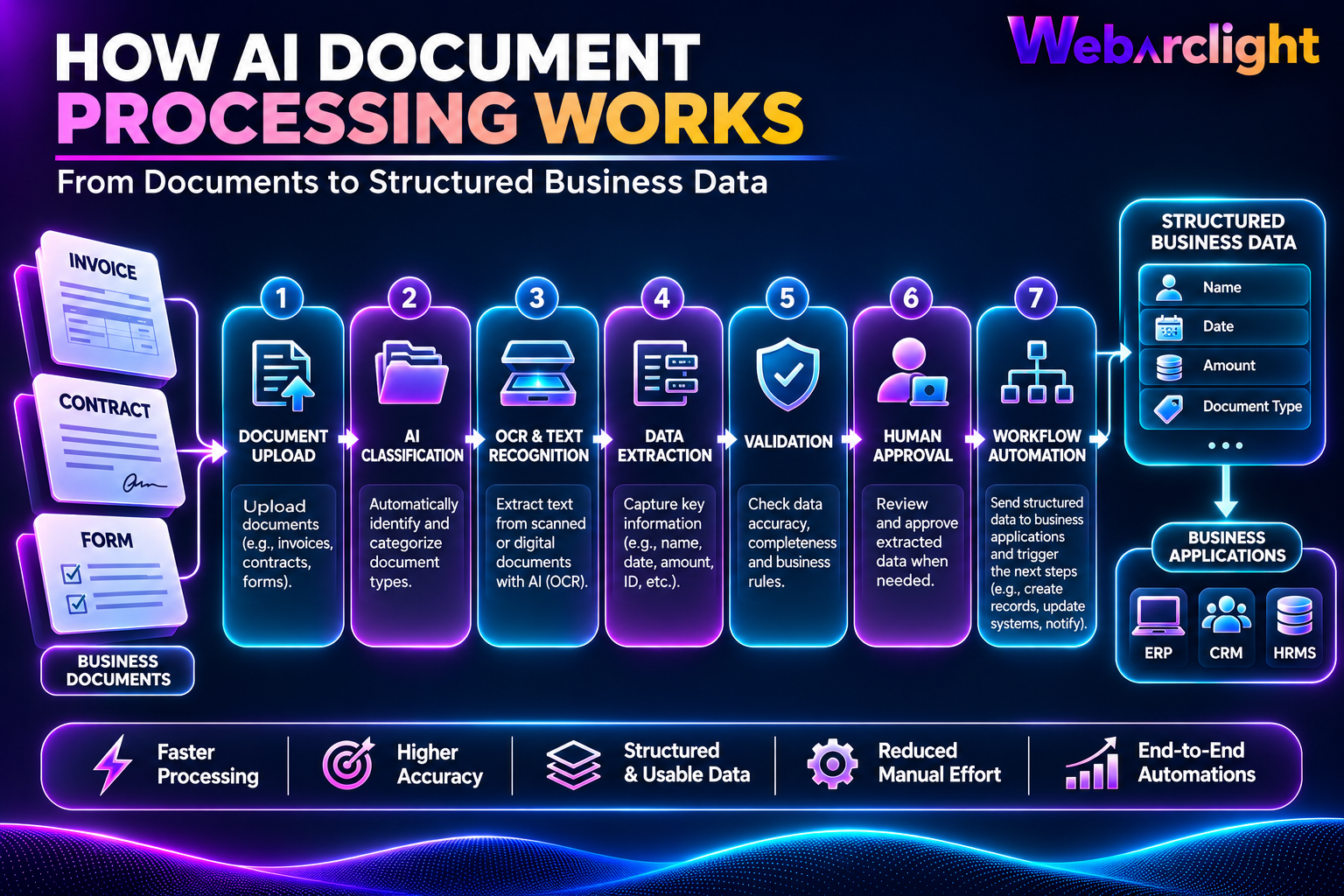
Businesses handle large volumes of documents every day. From invoices and contracts to customer forms, purchase orders, employee records and financial reports, important information is often stored in documents that require manual processing.
Traditionally, employees have had to read documents, identify relevant information, enter data into business applications and forward files to the appropriate departments. These activities consume time, increase operational costs and create opportunities for human error.
Artificial intelligence is changing this process.
With AI-powered document processing, businesses can automatically read documents, extract important information, classify files, validate data and trigger workflows with minimal manual intervention.
By combining technologies such as Optical Character Recognition (OCR), machine learning, Large Language Models (LLMs) and workflow automation, organisations can transform document-heavy operations into more efficient digital processes.
1. What Is AI-Powered Document Processing?
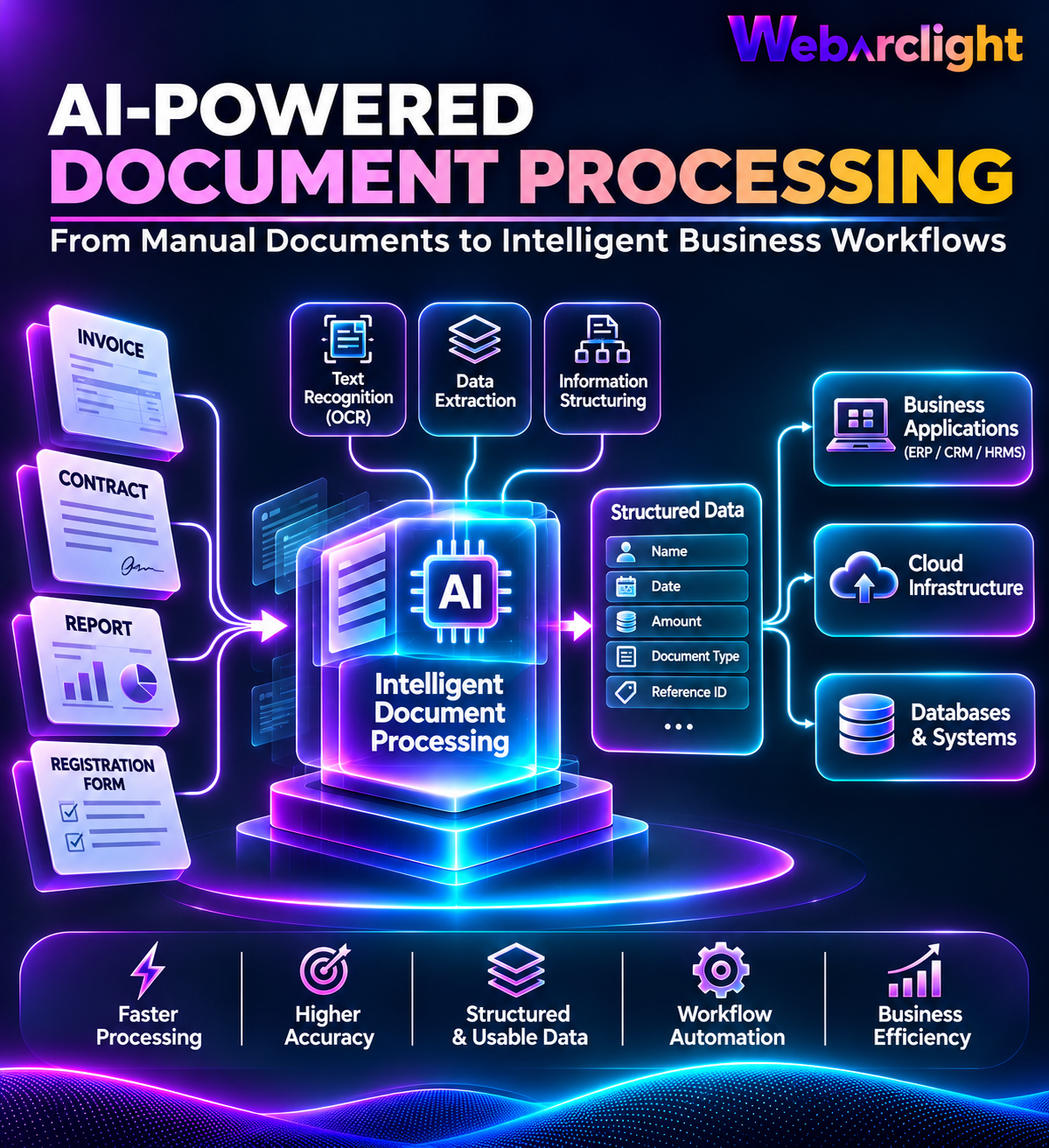
AI-powered document processing is the use of artificial intelligence technologies to automatically understand, extract, classify and process information from digital and scanned documents.
Traditional document processing often depends on fixed templates and predefined rules. This approach can work for standardised documents but becomes difficult when document formats, layouts and structures change.
AI-powered systems can handle a wider variety of documents by recognising text, understanding context and identifying relevant information.
For example, an intelligent document processing system can:
• Extract invoice numbers, dates and payment amounts.
• Identify customer details from registration forms.
• Read information from scanned documents.
• Classify contracts, receipts and business reports.
• Extract important clauses from legal documents.
• Identify missing or inconsistent information.
• Send extracted data to business applications.
• Trigger approval and verification workflows.
In simple terms, AI-powered document processing converts information trapped inside documents into structured data that businesses can use.
2. How Does AI-Powered Document Processing Work?
An intelligent document processing system generally follows a series of steps, starting with document collection and ending with automated processing or human verification.
Step 1: Document Collection
The system receives documents from different sources, including:
• Email attachments.
• Website upload forms.
• Cloud storage platforms.
• Scanners and digital devices.
• Enterprise resource planning (ERP) systems.
• Customer relationship management (CRM) platforms.
Documents may be available as PDFs, scanned images, Word files or other supported formats.
Step 2: Document Classification
Before extracting information, the system identifies the type of document it has received.
For example, an incoming file may be classified as an invoice, purchase order, contract, identity document or application form.
AI models can help identify document categories based on their text, structure and visual characteristics.
Step 3: Text Recognition Using OCR
Optical Character Recognition (OCR) converts text from scanned documents and images into machine-readable information.
For example, when a company uploads a scanned invoice, OCR can recognise the printed text and make it available for further processing.
Modern document processing systems may also use layout analysis and intelligent document understanding to identify tables, fields, headings and relationships between different elements.
Step 4: Information Extraction
After recognising the document content, the system identifies the information required for a particular business process.
For an invoice, this could include:
• Invoice number.
• Supplier name.
• Invoice date.
• Due date.
• Tax amount.
• Total payment amount.
• Purchase order reference.
AI models can help interpret information even when different suppliers use different invoice layouts.
Step 5: Data Validation
Extracted information should be checked before it is used in business applications.
For example, an invoice processing system may verify whether the supplier exists, whether the invoice number is valid and whether the calculated total matches the extracted amount.
If information is missing, inconsistent or uncertain, the system can send the document for human review.
Step 6: Workflow Automation
Once the information has been extracted and validated, the system can send it to the appropriate business application.
Depending on the workflow, this may involve:
• Creating an invoice record.
• Updating customer information.
• Sending a document for approval.
• Creating a task for an employee.
• Updating an ERP or CRM system.
• Triggering a notification or payment review.
This turns document extraction into a complete business automation process.
3. Major Technologies Behind Intelligent Document Processing
AI-powered document processing does not depend on a single technology. It combines several components that work together.
Optical Character Recognition (OCR)
OCR identifies and converts printed or handwritten text from scanned images and documents into machine-readable text.
It provides the foundation for processing documents that are not available in editable digital formats.
Machine Learning
Machine learning models can classify documents, recognise patterns and identify important information based on previously processed examples.
These capabilities help systems handle variations in document layouts and content.
Large Language Models (LLMs)
Large Language Models can interpret document content, summarise information, identify relationships and extract context-dependent details.
For example, an LLM can help identify important obligations in a contract or summarise a lengthy business report.
However, extracted information should still be validated, particularly when it affects financial, legal or operational decisions.
Natural Language Processing (NLP)
Natural Language Processing helps computer systems understand and analyse human language.
It can support document classification, entity recognition, text extraction and information analysis.
Workflow Automation
Workflow automation connects document processing with other business applications.
Once information has been extracted, automation tools can trigger approval requests, update databases, create records and notify the appropriate teams.
Combining these technologies creates an intelligent document processing system that can handle more than simple text extraction.
4. Real-World Business Applications of AI Document Processing
AI-powered document processing can support multiple departments and industries where information is regularly received, reviewed and transferred between systems.
Invoice and Financial Document Processing
Finance departments often handle hundreds or thousands of invoices, receipts and payment documents.
AI can extract supplier details, invoice numbers, payment amounts and due dates before transferring the information into accounting or ERP systems.
It can also help identify missing fields, duplicate invoices and inconsistent totals for further review.
HR and Employee Document Management
Human resource departments manage resumes, employee applications, identity documents, offer letters and other records.
AI-powered processing can help extract candidate information, classify applications and organise employee documents.
This can reduce repetitive administrative work and improve information accessibility.
Legal Document Analysis
Legal departments work with contracts, agreements, compliance documents and lengthy reports.
AI can assist with document classification, clause extraction, summarisation and identification of important dates or obligations.
Sensitive legal decisions should remain subject to appropriate professional review.
Healthcare Administration
Healthcare organisations process patient registration forms, insurance documents, medical reports and administrative records.
AI can help extract and organise relevant administrative information, reducing manual data entry.
Healthcare implementations must apply appropriate privacy, security and regulatory safeguards.
Customer Onboarding
Businesses often request customer information through registration forms, identity documents and supporting records.
AI can extract submitted information, identify missing fields and route applications for verification.
This can help organisations create faster and more consistent onboarding workflows.
Supply Chain and Procurement
Procurement teams process purchase orders, delivery records, supplier invoices and shipping documents.
Intelligent document processing can help extract order information, compare documents and update procurement systems.
5. Traditional Document Processing vs AI-Powered Document Processing
Traditional document processing often depends on manual entry, fixed templates and predefined rules.
AI-powered systems can combine text recognition, contextual understanding and automated workflows to handle a wider variety of documents.
Comparison Traditional Processing AI-Powered Processing
Data extraction Mostly manual or rule-based AI-assisted extraction
Document formats Often template-dependent Can handle varied layouts
Classification Manual or predefined rules AI-assisted classification
Context understanding Limited Can use contextual information
Validation Manual checks and fixed rules Automated checks with human review
Workflow integration Often requires manual transfer Can trigger connected workflows
Scalability More dependent on staff effort Can scale with infrastructure and workload
AI-powered processing is not automatically more accurate in every situation. Performance depends on document quality, model selection, extraction methods and validation controls.
The strongest implementations combine AI capabilities with business rules and human oversight.
6. How Businesses Can Build an AI Document Processing Workflow
A practical implementation does not need to automate every document process at once.
Businesses can begin with one repetitive workflow, evaluate the results and gradually expand the system.
Consider an organisation that receives hundreds of supplier invoices every month.
A possible workflow could operate as follows:
Step 1: Invoice submission
Suppliers send invoices through an email address or document upload portal.
Step 2: Automated document classification
The system identifies incoming files as invoices and separates them from unrelated documents.
Step 3: OCR and information extraction
The system extracts supplier details, invoice numbers, dates, tax information and payment amounts.
Step 4: Business rule validation
The extracted information is checked against supplier records, purchase orders and predefined accounting rules.
Step 5: Human approval
Invoices with missing information, unusual amounts or uncertain extraction results are forwarded to the finance team.
Step 6: Business application integration
Approved invoice details are transferred into the organisation's accounting or ERP system.
Step 7: Status tracking
The system records processing status and sends notifications when additional action is required.
This approach can reduce repetitive work while keeping important financial decisions under appropriate human control.
7. The Role of AWS in AI-Powered Document Processing
Cloud infrastructure provides the computing, storage, AI and integration capabilities needed to develop document processing applications.
Amazon Web Services (AWS) offers several services that can support different stages of an intelligent document processing architecture.
• Amazon Textract: Extracts text, handwriting, forms and tables from supported documents.
• Amazon S3: Stores uploaded documents and processed files.
• AWS Lambda: Executes document processing functions and application logic.
• Amazon Bedrock: Provides access to foundation models for tasks such as document summarisation, contextual analysis and information extraction.
• Amazon SQS: Supports message queuing between different processing components.
• AWS Step Functions: Helps coordinate multi-step document processing workflows.
• Amazon CloudWatch: Provides monitoring and logging capabilities.
For example, a document uploaded to Amazon S3 can trigger an automated workflow. AWS Lambda can initiate processing, Amazon Textract can extract document information, and additional application logic can validate and route the results.
For more complex requirements, foundation models available through Amazon Bedrock can support contextual document analysis.
The appropriate architecture depends on document volume, data sensitivity, processing requirements and integration needs.
8. Security and Accuracy Considerations
Automating document processing does not eliminate the need for security and validation.
Business documents may contain confidential customer information, financial details, employee records and sensitive company data.
Organisations should consider the following safeguards:
Data Protection
Use encryption, secure storage and appropriate access permissions to protect documents and extracted information.
Access Control
Ensure that employees and automated services can access only the documents and records required for their responsibilities.
Extraction Validation
Validate important extracted fields against business rules and trusted source records.
Human Review
Send low-confidence results, unusual transactions and high-impact decisions for human verification.
Audit Trails
Maintain records of document uploads, extraction results, modifications, approvals and workflow actions.
Secure AI Integration
Protect connected AI models, APIs and automation services from unauthorised access and malicious inputs.
Document Retention
Define how long documents and extracted data should be stored, who can access them and when they should be securely deleted.
A reliable document processing solution should balance automation with accountability, privacy and accuracy.
9. How to Get Started with AI Document Processing
Businesses can adopt intelligent document processing through a structured implementation approach.
1. Identify repetitive document tasks: Find processes that involve frequent manual reading, data entry and document classification.
2. Select a suitable use case: Start with a well-defined workflow, such as invoice extraction or customer registration.
3. Understand document formats: Identify the types of files, layouts and information that need to be processed.
4. Choose the right technologies: Evaluate OCR, AI models, storage systems and workflow automation tools.
5. Connect business applications: Integrate the solution with existing CRM, ERP, accounting or document management platforms.
6. Establish validation controls: Define business rules, confidence thresholds and human approval requirements.
7. Measure performance: Track extraction accuracy, processing time, manual intervention and operational cost.
8. Expand gradually: Improve the workflow and introduce additional document categories after evaluating the initial implementation.
Starting with a measurable business problem helps organisations avoid unnecessary complexity and build solutions that deliver practical value.
10. The Future of Intelligent Document Processing
Document processing is evolving from basic OCR and data extraction towards systems that can interpret information and participate in larger business workflows.
With improvements in generative AI, multimodal models and intelligent agents, businesses can explore applications that understand different document types, identify relevant information and coordinate follow-up actions.
For example, an AI-powered system could receive a supplier contract, identify important clauses, extract renewal dates, compare them against internal policies and create a review task for the legal department.
When combined with agentic AI, document processing can become part of a broader automated business environment.
Technologies such as ChatGPT, Claude AI, AWS Bedrock and other enterprise AI platforms can support different stages of these solutions, depending on the use case and technical architecture.
The long-term opportunity is to move beyond digitising documents and towards making business information more accessible, structured and actionable.
Conclusion
AI-powered document processing is helping businesses reduce manual data entry, improve information accessibility and automate repetitive document-related tasks.
By combining OCR, machine learning, Large Language Models and workflow automation, organisations can build systems that classify documents, extract information, validate records and connect the results to existing business applications.
However, successful implementation requires more than selecting an AI model. Data protection, extraction accuracy, workflow integration and human oversight are essential parts of a reliable solution.
As businesses continue adopting AI and automation, intelligent document processing can become an important part of their digital transformation strategy.
At WebArclight, we help businesses explore AI application development, cloud infrastructure and intelligent automation solutions that transform repetitive processes into efficient digital workflows. https://webarclight.com/
Comments
No Comments Yet
Be the first to share your thoughts!